
By [Jawad Shah] – Finance & Expense Automation Specialist
Managing personal finances doesn’t require complicated spreadsheets or hours of formula troubleshooting. Many people assume they need Excel expertise to create an effective monthly budget template without Excel, but modern solutions have made budget planning accessible to everyone—regardless of technical skill level.
The shift toward digital budgeting tools for personal finance has transformed how individuals approach personal finance management. Instead of wrestling with cells and formulas, people can now track spending, monitor savings goals, and maintain financial discipline using intuitive online platforms designed specifically for budgeting.
This guide explores how to create a functional monthly budget template online without touching a spreadsheet, discovering the benefits of budget planning without spreadsheets, and understanding why online tools often outperform traditional Excel methods.
What Is a Monthly Budget Template?
A monthly budget template serves as a structured framework for monthly income and expense tracking within a specific time period. This tool helps individuals organize their financial inflows and outflows into clear categories, making it easier to understand where money comes from and where it goes each month.

The purpose of using a personal budget template extends beyond simple record-keeping. These templates provide visibility into spending patterns, help prevent overspending, and create accountability for financial decisions. By establishing clear categories and limits, people gain better control over their cash flow management.
Core Components
Every effective budget template for beginners includes several essential elements:
Income Sources – Primary employment salary, side hustle earnings, freelance income, and investment returns.
Fixed Expenses – Consistent costs like rent or mortgage payments, insurance premiums, loan payments, subscription services, and predictable bills.
Variable Expenses – Fluctuating costs, including groceries, dining out, entertainment, transportation, and discretionary spending.
Savings Allocations – Modern templates incorporate savings goal tracking features for emergency funds, retirement contributions, vacation plans, and other financial objectives.
The beauty of a well-designed household monthly budget template lies in its ability to simplify complex financial information into digestible categories. Templates also provide a historical record revealing spending trends across multiple months, helping people understand seasonal variations and plan accordingly.
Can I Make a Budget Without Using Excel?
Yes, absolutely. Creating an effective budget without Excel is not only possible—it’s often easier and more practical for most people.
The assumption that budgeting requires spreadsheet software stems from older financial advice that predates modern web applications. While Excel remains powerful for certain uses, it was never specifically designed for personal budgeting. The learning curve, time investment, and technical requirements make it unnecessarily complicated for everyday money management template needs.
Benefits of Online Budget Tools
The advantages of using a budget planner without spreadsheets become clear when comparing day-to-day usage:
Setup Speed – Creating a functional budget takes 5-10 minutes with online tools versus 30-60 minutes building an Excel template from scratch.
Zero Learning Curve – Most online platforms require no training. The interface guides users through each step with helpful prompts. Excel assumes familiarity with spreadsheet concepts like cells, ranges, and functions.
Error Prevention – Automatic calculations eliminate the possibility of typing wrong formulas or accidentally deleting critical cells. The system maintains data integrity regardless of user actions.
Mobile Accessibility – Users can check their budget and log expenses from smartphones while grocery shopping, at restaurants, or anywhere else spending occurs. This immediate access promotes consistent tracking habits.
Real-Time Syncing – All data stays synchronized across multiple devices. Changes made on a phone immediately appear on tablets or computers, ensuring everyone works with current information.
The easiest way to make a monthly budget doesn’t involve mastering spreadsheet software. Modern online platforms handle all technical complexity behind the scenes, allowing users to focus on financial decisions themselves.
Excel vs Online Budget Tools: Quick Comparison
| Feature | Excel Budgeting | Online Budget Tools |
| Setup Time | 30-60 minutes | 2-5 minutes |
| Learning Curve | Moderate to high | Minimal |
| Mobile Access | Limited | Full functionality |
| Calculations | Manual formulas | Built-in automatic |
| Error Risk | High | Minimal |
| Collaboration | Difficult | Seamless |
| Visual Reports | Manual creation | Auto-generated |
| Typical Cost | $70-150/year | Often free |
The modern alternative to Excel budgeting doesn’t try to replace spreadsheets entirely. Instead, it recognizes that most people need straightforward income and expense tracking rather than advanced financial modeling capabilities.
How to Create a Monthly Budget Without Excel: Step-by-Step
Building an effective step-by-step monthly budget setup involves a straightforward process that anyone can complete in less than 15 minutes.
Step 1: Choose Your Online Budget Platform
The foundation of successful budget planning using online tools starts with selecting the right tool. Essential features to evaluate include an intuitive interface, pre-built category structures, mobile app availability, and free access to core functionality.
Recommended: Expensetrackertool.com
This platform offers several advantages for people creating their first simple monthly budget template for beginners:
- Zero-friction onboarding with no mandatory registration walls
- Pre-configured templates covering common household scenarios
- Clean interface focusing on essential features
- Full mobile compatibility for tracking expenses anywhere
- Completely free access to core budgeting functionality
Call to Action: Start budgeting online in under 2 minutes with our free tool.
Step 2: Calculate Total Monthly Income
Accurate income calculation forms the foundation of any effective budget. This figure represents actual money available for allocation across spending categories and savings goals.
Include primary employment (use net take-home pay after taxes), secondary income streams like freelance work or side businesses, and investment dividends. For variable income, use the lowest monthly amount from the past six months as a baseline, or calculate a 6-12 month average and set aside excess during high-income months.
Step 3: List All Fixed Expenses
Fixed expenses represent the most predictable budget component. These costs remain consistent month-to-month, including:
- Housing costs (rent, mortgage, property taxes, insurance)
- Loan obligations (student loans, auto loans, personal loans)
- Insurance premiums (health, auto, life)
- Subscriptions and memberships (streaming services, gym, software)
- Communication services (cell phone, internet)
Beginning with fixed and variable expenses makes strategic sense because these must be paid regardless of other financial pressures. After entering a fixed expense once and marking it as recurring, online systems automatically populate that expense in future months.
Step 4: Identify Variable Expenses
Variable expenses fluctuate based on usage patterns and lifestyle choices. Major categories include food and dining, transportation, utilities, personal care, healthcare, entertainment, and household items.
The most accurate way to track monthly expenses online involves reviewing actual spending from previous months through bank statements or credit card histories. Calculate average monthly spending in each category, then add a 10-15% buffer for unexpected variations.
Modern expense tracking software makes managing variable expenses much less burdensome through quick mobile entry, automatic categorization, running totals showing remaining budget, and receipt photo capture.
Step 5: Set Savings and Financial Goals
Effective budgeting extends beyond managing expenses—it actively directs money toward future objectives. The savings goal tracking component transforms a budget from restrictive spending limits into a positive financial plan.
Types of Savings Goals:
- Emergency fund (3-6 months of expenses)
- Short-term goals (vacation, electronics, vehicle down payment)
- Medium-term goals (home down payment, career training)
- Long-term goals (retirement savings, children’s education)
The 50/30/20 Framework
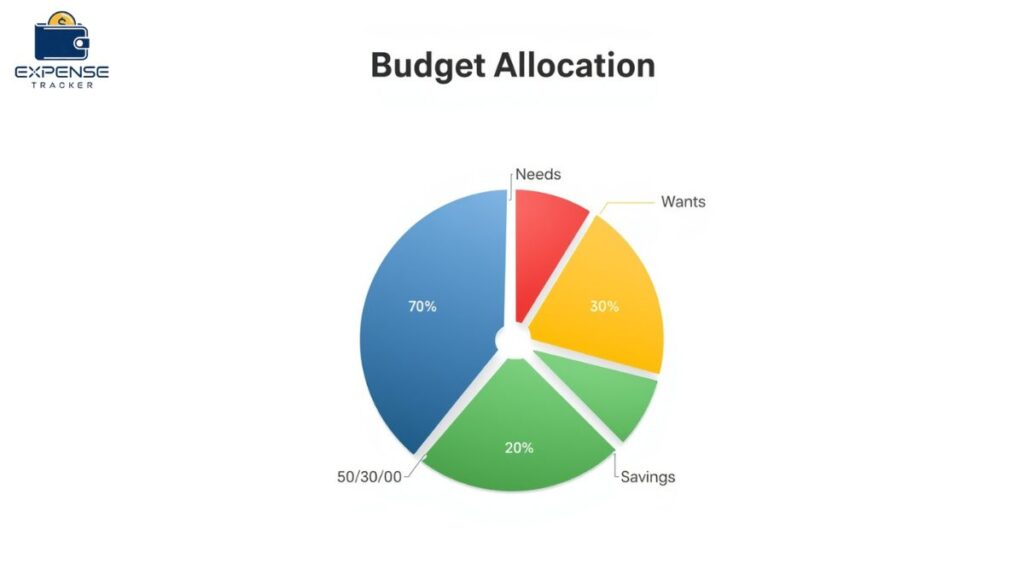
This popular allocation strategy provides simple guidance for monthly income allocation:
- 50% Needs – Essential expenses including housing, utilities, groceries, transportation
- 30% Wants – Discretionary spending on dining out, entertainment, hobbies
- 20% Savings – Emergency fund contributions, retirement savings, debt repayment
A critical mindset shift involves treating savings as a fixed expense rather than “whatever’s left over.” Schedule automatic transfers to savings accounts on payday, then budget remaining income for expenses.
Step 6: Input Data Into Your Budget Tool
With all financial information gathered, the actual budget creation becomes straightforward. Most simple monthly budget planner platforms follow a similar workflow:
- Add each income source with net monthly amounts
- Enter fixed expenses with payment due dates
- Set budget limits for variable expense categories
- Configure savings goals with target amounts and timelines
- Begin tracking expenses immediately
Complete initial setup typically requires 10-15 minutes—a one-time investment establishing the foundation for months of effortless tracking.
Call to Action: Track expenses automatically with our free budget tool—accessible from any device, anytime.
Step 7: Monitor and Adjust Throughout the Month
Creating a budget represents just the beginning. Regular monitoring transforms it from a static document into a dynamic personal finance management system.
Weekly Check-ins – Review spending patterns, identify categories depleting too quickly, and make proactive adjustments.
Real-Time Tracking – Modern digital budgeting tools for personal finance provide constant visibility through current spending totals, remaining budget in each category, and alerts when spending approaches limits.
Monthly Reviews – Compare actual versus budgeted spending, refine allocations based on results, evaluate savings goal progress, and adjust next month’s budget.
Most people follow a predictable progression: Month 1 reveals where money actually goes (discovery phase), Months 2-3 refine categories to reflect reality (optimization), and Month 4+ sees budgeting become habitual (mastery).
Best Online Budget Templates for Beginners
The best monthly budget template online free options combine ease of use with sufficient functionality to meet most personal finance needs.
Essential Features
Automatic Calculations – Every total updates automatically as data is entered without creating formulas.
Mobile-First Design – Given that most spending occurs away from computers, platforms must function seamlessly on smartphones.
Visual Progress Indicators – Budget status should be immediately apparent through progress bars, color coding, and charts.
Goal Tracking Integration – Rather than treating goals separately, the best platforms integrate them seamlessly with daily spending decisions.
Why Expensetrackertool.com Stands Out
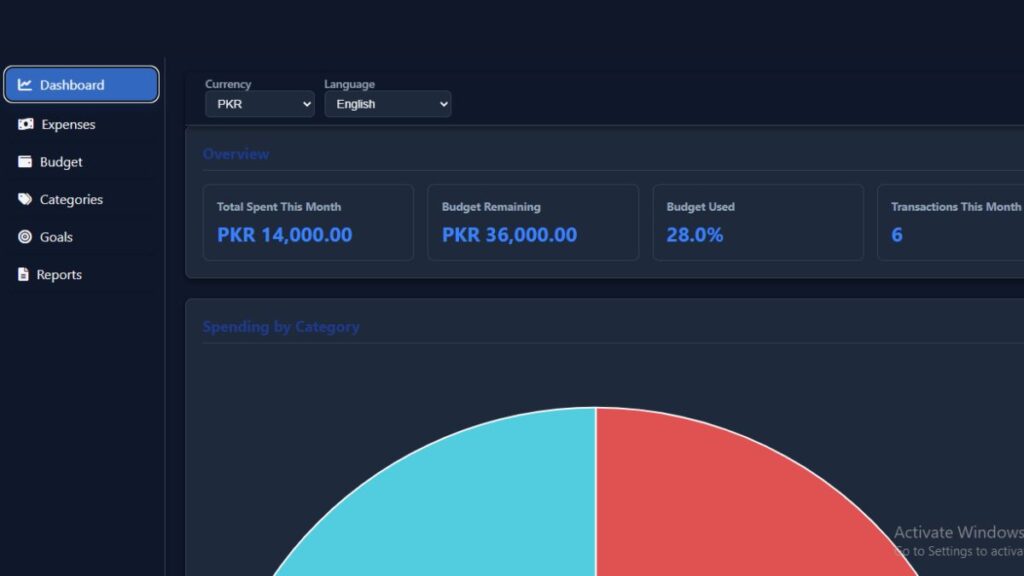
Zero Learning Curve – The interface presents exactly what users need when they need it, with no tutorials required.
Comprehensive Free Access – Full-featured access without paywalls, unlike platforms that limit free tiers to basic functionality.
Pre-Built Templates – Select from templates designed for single-person households, couples, families, students, or retirees—each with appropriate pre-configured categories.
Mobile Excellence – The smartphone app provides full functionality for logging expenses, reviewing budget status, checking savings progress, and adjusting allocations.
Getting Started:
- Visit Expensetrackertool.com
- Create a free account (30 seconds)
- Select a matching template
- Enter income and expenses
- Begin tracking immediately
Call to Action: Create your monthly budget instantly—no Excel required.
Common Budgeting Mistakes to Avoid
Understanding frequent pitfalls helps establish effective smart budgeting practices from the start.
Mistake #1: Underestimating Variable Expenses
Many beginners drastically underestimate spending in categories like groceries and entertainment. Review 3 months of actual spending before setting limits, then add a 10-15% buffer. Historical data on online platforms makes seeing real averages easy rather than guessing.
Mistake #2: Forgetting Irregular Expenses
Annual or quarterly costs like car registration or insurance premiums aren’t included in monthly budgets. Create a comprehensive list of all irregular yearly expenses, divide by 12, and include that monthly amount. Example: $1,200 annual car insurance = $100/month to set aside.
Mistake #3: Being Unrealistically Restrictive
Extremely restrictive budgets feel punishing and unsustainable, leading to abandonment. Build budgets including reasonable allowances for enjoyment. The 50/30/20 framework specifically allocates 30% to “wants” because sustainable financial discipline requires balance.
Mistake #4: Treating Savings as Optional
Many view savings as “whatever’s left over”—rarely resulting in meaningful accumulation. Implement “pay yourself first”: configure automatic transfers to savings on payday, treat savings like fixed expenses that must be paid, and then budget remaining income.
Mistake #5: Using Overly Complex Systems
Start with simple systems and add complexity only if specific benefits emerge. The best budget is one used consistently. A simple system maintained daily outperforms an elaborate system too burdensome to sustain.
Take Control of Your Finances Today
Creating a monthly budget template without Excel represents the first step toward financial confidence. The process doesn’t require technical expertise, significant time investment, or complicated spreadsheets. Modern budget planning without spreadsheets makes money management accessible to everyone.
Key principles to remember:
- Start simple with pre-built templates
- Focus on consistency over perfection
- Use tools designed for personal finance
- Review and adjust monthly
- Treat savings as priority expenses
The shift from Excel to online budget planning tool platforms removes barriers that previously prevented effective money management habits. Mobile access, automatic calculations, and visual feedback transform budgeting from a dreaded chore into a manageable routine.
Ready to Start Your Budgeting Journey?
✓ Setup completes in under 5 minutes
✓ No technical skills needed
✓ Track expenses from any device
✓ Completely free to start
Visit Expensetrackertool.com and experience how simple modern budgeting can be. Join thousands who have taken control of their finances using straightforward, effective, free budgeting template online tools.
The first step toward financial goals is always the hardest—make it easier by choosing tools designed specifically for success.
Conclusion
Creating a monthly budget template without Excel isn’t just about tracking numbers—it’s about taking control of your financial destiny. The good news? That first step has never been easier.
Every day without a budget means uncertainty about spending, stress over unexpected expenses, and missed opportunities to achieve financial goals. But today can be different.
Start Your Budget in Just 5 Minutes
Here’s what happens when you begin right now:
Minutes 1-2: Visit Expensetrackertool.com and create your free account—no credit card required.
Minutes 3-4: Select a pre-built template matching your situation.
Minute 5: Enter your income and first expenses. Watch the system automatically calculate everything.
That’s it. Five minutes from now, you’ll have a functional budget working for you.
What You Gain Immediately
✓ Crystal-Clear Visibility – See exactly where every dollar goes
✓ Mobile Freedom – Track expenses anywhere from your phone
✓ Automatic Calculations – No formulas, no errors, no spreadsheet headaches
✓ Real-Time Insights – Know your budget status instantly
✓ Financial Confidence – Make decisions based on facts, not guesses
✓ Peace of Mind – Sleep better with organized finances
And it’s completely free. No subscription fees, no feature limitations, no hidden costs.
🚀 Ready to Start?
[Create Your Free Budget Now – Takes Under 2 Minutes →]
No downloads. No waiting. No barriers between you and financial clarity.
Or download the mobile app:
[iOS App] | [Android App]
The Choice Is Simple
Without a budget: Money disappears to unknown places, savings stagnate, and financial stress continues.
With a budget: Savings grow, anxiety decreases, and goals become achievable.
Which path leads to where you want to go?
Don’t Wait Another Month
Every successful financial journey begins with a single decision to start. Thousands have already discovered how simple budgeting can be with the right tool.
You deserve financial peace of mind.
You deserve to achieve your goals.
You deserve tools that work FOR you.
Stop letting spreadsheet complexity stand between you and financial success. The solution is here—free, simple, and effective.
[🎯 Start Your Free Budget Now →]
Visit Expensetrackertool.com and discover why thousands have ditched Excel for smarter budgeting.
FAQs
Q: What is the easiest way to make a monthly budget?
A: Use a pre-built online monthly budget planner with templates, automatic calculations, and guided setup requiring no financial expertise. The process takes under 10 minutes compared to 30-60 minutes building Excel spreadsheets.
Q: Can I make a budget without using Excel?
A: Absolutely. Modern budgeting apps and tools provide superior functionality without spreadsheet knowledge. The manage money without Excel sheets approach offers pre-built templates, mobile apps, cloud synchronization, and visual dashboards—often more effectively than custom Excel solutions.
Q: What is the best alternative to Excel for budgeting?
A: Purpose-built platforms like Expensetrackertool.com offer comprehensive budgeting functionality without the complexity of spreadsheets, featuring intuitive interfaces, mobile access, automation, real-time updates, visual reports, and collaboration tools.
Q: How do beginners create a monthly budget?
A: Follow this step-by-step monthly budget setup: calculate your net monthly income, list fixed expenses, estimate variable expenses, set savings goals, choose a tracking method, track all expenses, and review your allocations monthly to adjust them based on reality.
Q: Are online budget templates better than spreadsheets?
A: For personal finance, online templates typically provide superior experiences with zero setup time, mobile-first design, automatic calculations, real-time synchronization, built-in visual reports, and collaborative access—usually free or low-cost.
Q: How can I track monthly expenses automatically?
A: Use automatic expense tracking tool features, including bank account linking (imports transactions automatically), mobile app receipt capture, recurring expense configuration, smart categorization learning patterns, and email integration scanning for purchase confirmations.

Finance & Expense Automation Specialist With 3 years of experience.